Xplora
- 4.3
- Rating
- 500.00K
- Installs
- Free
- Price

 Analysis by App-foxy
When I first looked at Xplora, I saw a parenting app with a very specific purpose rather than another general family organizer. It is designed to work with an Xplora kids watch and with a smartphone using Xplora parental control, so its usefulness depends heavily on the device setup in your family. That focus is both its main strength and its biggest limitation.
In my experience, the app makes the most sense for parents who want one place connected to an Xplora watch, especially when a child is beginning to have a little more independence but still needs a parent-managed communication setup. It is not the kind of parenting app I would install simply to keep a shared calendar, record milestones, or collect general family notes. Its role is narrower and more practical: it sits between a child’s connected watch or phone and the adult responsible for managing that connection.
The app is free, which makes trying it less intimidating than starting with a paid parenting service. The important point is that free access to the app should not be confused with every possible cost connected to the wider Xplora setup. The app itself is listed as free, while the watch, smartphone, mobile service, or other equipment your family chooses may involve separate decisions. I would therefore judge its value as a companion to the Xplora ecosystem, not as a complete parenting solution on its own.
You May Also Like

 Blood Strike: 2.5 Anniversary
Blood Strike’s Loadouts Turn Every Drop Into a Tactical Gamble
A close look at Blood Strike’s custom loadouts: how fast access to signature weapons reshapes its battle royale rhythm, rewards preparation, and narrows the gap between fights.

 Pandora - Music & Podcasts
Pandora’s Music Is Easy to Start, but Harder to Recover
Pandora’s strength is its low-effort path from a seed to a station. Its weak spot is how much confidence it asks you to place in connection, setup, and quiet recovery.

 8 Ball Pool
 Is Built on Rivalries, Rematches, and Routine
A close look at the rivalries, rematches, shared routines, and unanswered safety questions that turn a quick pool match into a persistent mobile community.

 Samsung Music
’s Quiet Strength Is Playing What You Already Own
Its reach comes less from spectacle than from dependable access to a personal library. That simplicity is both the app’s strongest retention engine and its ceiling.

 AccuWeather: Weather Radar
AccuWeather Review: A Quick, Clear Forecast for Everyday Decisions
For everyday plans, the best forecast is the one you can understand quickly. AccuWeather makes rain timing, radar, and local conditions easy to act on, with a few trade-offs.

 Hill Climb Racing
Why Hill Climb Racing Still Turns Crashes Into One More Run
A tiny car, a bumpy hill and one more upgrade: Hill Climb Racing keeps resurfacing because its simple chaos makes every near-miss feel personal.
More From Our News Desk
View All News


How Xplora fits into everyday family routines
I find Xplora easiest to judge by the small decisions it can help a family make around a child’s connected device: what to set up before a busy morning, how to keep expectations clear, and when a watch-based arrangement is enough. Those routines matter more than simply having another app on a parent’s phone. They also make it easier to see where a dedicated tool can help—and where a family may need a broader solution instead.
A focused control point for parents
The developer, Xplora App, has positioned this as a family-management tool connected to children’s devices. That immediately separates it from ordinary messaging apps. With a standard messaging service, parents often have to think about accounts, contacts, settings, and the wider social environment around a child. Here, the central idea is a parent-controlled connection involving an Xplora watch or a smartphone configured with Xplora parental control.
That focus can make the experience easier to understand for families who already use compatible Xplora equipment. Instead of asking a young child to navigate a broad communication platform, the parent starts from the device relationship. The app becomes the adult-facing side of that arrangement. I find that approach more suitable for early device ownership than handing over a normal smartphone and expecting a child to manage every setting responsibly.
At the same time, this is not a universal replacement for the phone features your child may eventually need. A family looking for a full school communication system, a general-purpose messenger, or a broad collection of family planning tools should not expect this app to cover all those needs. Its value comes from keeping the Xplora connection manageable, not from trying to become every parenting tool in one place.
A realistic school-day example
Imagine a child walking home from school while a parent is still at work. The child has an Xplora watch, and the parent uses the app as the adult control point. The family can build its routine around that arrangement: the child carries a simpler connected device, while the parent remains responsible for the communication setup. If the child later moves to a smartphone with Xplora parental control, the same general relationship can remain part of the family’s system instead of changing immediately to an unrestricted phone experience.
That scenario is useful because it shows where the app earns its place. It is not merely another icon on the parent’s phone; it supports a gradual step toward independence. A child can have a way to stay connected without the family treating a full smartphone as the only option. For parents who want that middle stage, the idea is more compelling than a generic messaging app.
I would still establish expectations outside the app. Decide when the child should contact you, what counts as urgent, and what happens if the watch or phone is forgotten, uncharged, or unavailable. No parental-control app can replace those conversations. The best results come when the technology supports a family rule rather than becoming the rule by itself.
What free access really means here
The free price is a genuine advantage for evaluating the software. You can consider whether the interface and control model suit your household without adding an app subscription to the decision. That makes the first step relatively straightforward, particularly for parents who already own compatible Xplora hardware and only need the companion experience.
However, I would not make a purchase decision based on the word “free” alone. The practical value depends on having the right Xplora device or a smartphone arrangement that supports Xplora parental control. If you do not have compatible equipment, the app is unlikely to become useful simply because it costs nothing to download. In other words, the app has free access, but its usefulness is ecosystem-dependent.
This distinction matters when comparing it with ordinary free messaging apps. A general messenger may offer free communication between many kinds of phones, but it may not provide the same parent-centered structure. Xplora is the more relevant choice when the family’s priority is controlled use with an Xplora watch or managed smartphone. The general messenger is more flexible when compatibility and broad communication matter more than a child-focused setup.
Compatibility should guide the first decision
The store information describes compatibility with an Xplora kids watch and a smartphone with Xplora parental control. I would check that point before spending time planning a family workflow. The first question is not whether the app looks appealing; it is whether your child’s device and your intended setup belong to the supported Xplora arrangement.
This is also a useful way to avoid a common mistake: installing a companion app before deciding which device the child will actually use. A watch-based routine and a smartphone-based routine can feel very different in daily life. The watch may suit a younger child who needs a simpler device, while the smartphone route may fit an older child who needs more flexibility but still requires parental oversight. The app is relevant to both described paths, but the family should choose the device experience first.
For a household with several children, I would also think about whether every child needs the same level of connection. One child might benefit from the watch arrangement while another may already be ready for a more conventional phone. Treating the app as a tool for a specific child, rather than automatically applying it to everyone, can prevent unnecessary complexity.
Small workflow choices that make a difference
One practical insight is to set up the parent’s routine before the child begins relying on the device. Open the app at a calm time, connect the intended device, and decide how you will check it during the day. This avoids turning the first school morning into a troubleshooting session. It also lets you see whether the app’s organization feels natural to you before the child depends on it.
A second useful habit is to keep the child’s communication plan simple. Young users generally benefit from knowing exactly which situations justify contacting a parent and which situations can wait. The app can support the connection, but a short family agreement makes the technology easier to use. I would explain the plan in plain language and revisit it when the child’s routine changes.
A third trade-off concerns independence. Parental control can provide reassurance, but too much checking can make the arrangement feel intrusive. I would use the app to support safety and communication rather than turning every ordinary movement into a reason for constant supervision. The right balance depends on the child’s age, maturity, route, and family circumstances.
Where the app is less convincing
The narrow purpose that makes Xplora approachable can also make it feel limited. If you want one app for shared shopping lists, school schedules, family appointments, health records, and child-device management, this is not the obvious choice. Its parenting category describes its audience, but it does not mean the app replaces a full family organizer.
There is also a dependency on the wider setup. A free companion app cannot deliver much value if the compatible watch or managed smartphone is not part of your household. That is a more important limitation than any individual interface preference because it affects whether the app has a role at all.
Parents who want their child to use a standard smartphone without a specialized ecosystem may prefer a different solution. General phone controls can be more appropriate when the family needs broad app management, communication across many platforms, or a device that will continue serving the child through later stages. Xplora is better suited to the transitional period where controlled connectivity is the priority.
I would also avoid assuming that a parental-control app removes every responsibility from the adult. Families still need to manage charging, device care, connectivity, and expectations. The app may organize the parent side of the relationship, but it cannot guarantee that a child will remember to carry the device or respond at the right moment. That practical reality should be part of the decision.
Who is likely to get the most value?
The strongest audience is a parent who already owns, or is seriously considering, an Xplora kids watch. For that person, the app is not an abstract parenting download; it is part of making the chosen device useful. The free price lowers the barrier to testing the setup, and the parent-focused design matches a family that wants controlled communication rather than unrestricted smartphone access.
It can also suit parents who want a gradual technology transition. A child may not need a full phone yet, but may benefit from a way to stay connected during school, activities, or short independent journeys. In that situation, the Xplora approach can feel more proportionate than giving the child a conventional smartphone simply because communication is needed.
Families moving from a watch to a smartphone may find the compatibility with a smartphone using Xplora parental control especially relevant. The child’s hardware can change while the parent still looks for a managed relationship rather than a completely open device experience. I would treat this as a useful bridge, not necessarily a permanent answer for every stage of childhood.
The app may be less suitable for parents who do not use Xplora hardware or who need a platform-neutral solution. It is also not my first recommendation for a family seeking a general social or messaging app. In those cases, the ecosystem connection becomes an inconvenience rather than an advantage.
What the current app details suggest
Xplora is listed as an app in the parenting category, with a Everyone content rating. That is consistent with its family-oriented purpose, although an Everyone label should not be mistaken for a guarantee that every setup is appropriate without adult guidance. The child’s age, device habits, and family rules still matter more than a store label when deciding how to use it.
The app has an average rating of 4.3 from around 14 thousand ratings, which suggests that many users find the overall idea worthwhile. I treat that as a useful signal rather than a promise. Companion apps can be judged very differently depending on whether the user already owns the matching hardware, so a parent with an Xplora watch is likely to evaluate it more favorably than someone browsing without that context.
It has passed half a million installs, giving the product a meaningful user base without making popularity the main reason to choose it. The app was released on April 14, 2025, and the current version is 0.3.8. It supports Android 7.0 and later, which is helpful for families using older Android phones, though I would still keep the parent’s phone updated where possible for a smoother experience.
The listing shows 16 reviews, a detail that I would interpret carefully alongside the broader rating and install figures. A rating can tell me how users feel overall, but it cannot decide whether the app fits my household’s exact device arrangement. I would give more weight to compatibility and daily workflow than to a single score.
How it compares with the usual alternatives
Compared with a normal messaging app, Xplora offers a more specialized parent-child relationship. The advantage is focus: the family can build communication around a compatible kids watch or a managed smartphone. The disadvantage is flexibility. A general messenger can usually work across a wider range of devices and contacts, while Xplora makes sense inside its own arrangement.
Compared with built-in smartphone parental controls, Xplora feels more closely tied to the child’s initial device experience. Built-in controls may be stronger for managing a mature smartphone with many applications, accounts, and web activities. Xplora is more attractive when the goal is to introduce connectivity in a controlled, child-oriented way rather than supervise a fully open phone.
Compared with a family organizer, the difference is even clearer. A calendar or shared-list app helps coordinate the household, but it is not necessarily built around a child’s connected watch or parental-control relationship. Xplora addresses a device and communication need; it should be paired with another tool if your family also needs planning and organization.
That comparison leads to a simple trade-off. Choose Xplora when the dedicated ecosystem is exactly what you want. Choose a broader alternative when device freedom, platform neutrality, or all-in-one family management matters more than a controlled Xplora connection.
My verdict for parents deciding today
I see Xplora as a focused, sensible companion app rather than a complete parenting platform. Its free access makes evaluation easier, and its purpose is clear for families using an Xplora kids watch or a smartphone with Xplora parental control. The strongest value appears when a parent wants to give a child some independence without immediately handing over an unrestricted smartphone.
Before choosing it, I would confirm that the intended child’s device fits the Xplora setup, decide whether a watch or managed smartphone is the better stage for your family, and agree on simple communication rules. I would also consider the wider equipment and service costs separately from the app’s free price. That keeps the decision realistic and prevents the companion software from being judged in isolation.
My recommendation is positive for the right household: use Xplora when controlled child-device communication is the goal, not when you need a universal family app. Parents already invested in the Xplora ecosystem should find the app much easier to justify than families starting from scratch. If your priorities are broader phone management, unrestricted compatibility, or a full family organizer, another option may serve you better.
After reviewing its role, audience, cost position, and trade-offs, I would describe Xplora as a useful bridge between no connected device and a conventional smartphone. It does not remove the need for parenting decisions, but it can make that transition more deliberate. For a family that values that middle ground, it is worth trying; for everyone else, the free download alone is not a reason to build a routine around it.
FAQs for Xplora
01What is Xplora and what does it offer?
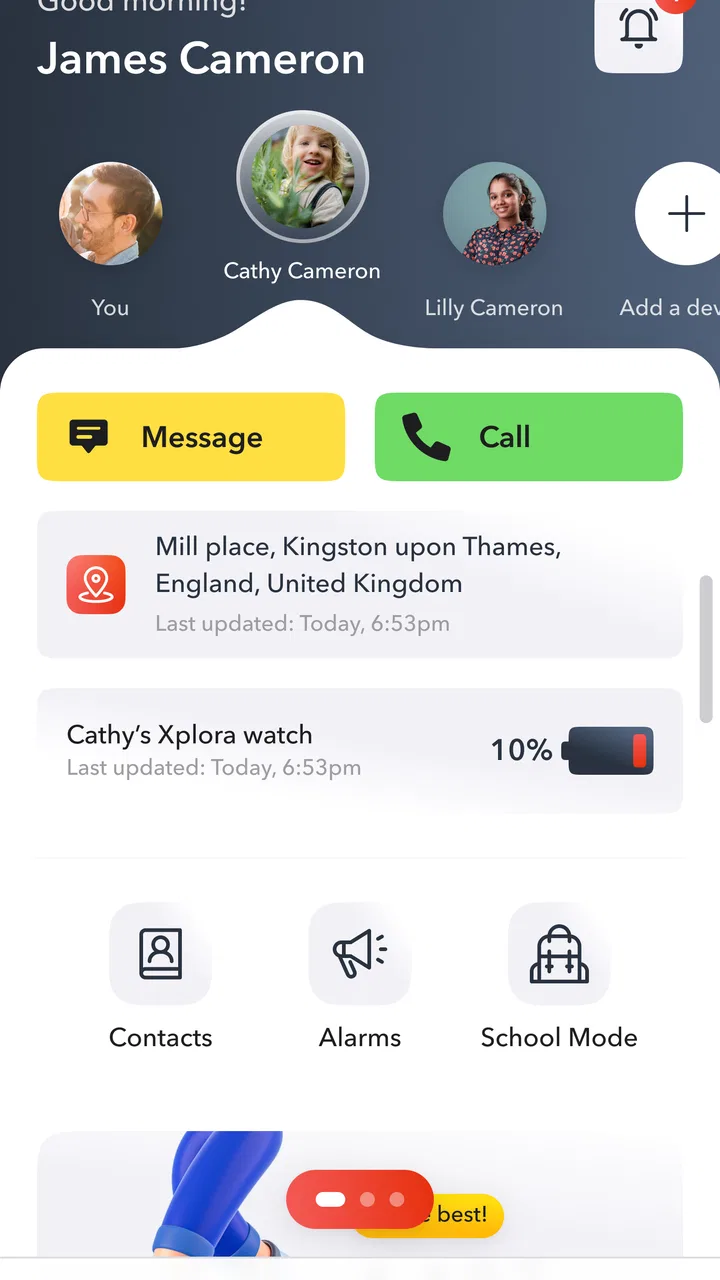
Xplora is a versatile smartwatch app designed primarily for kids, offering features like GPS tracking, safe zones, and step counting. It provides parents with peace of mind by allowing them to monitor their child's location and communicate through calls and messages. The app also encourages physical activity with engaging challenges.
02Is Xplora safe for children to use?
Yes, Xplora is designed with children's safety in mind. It allows parents to set safe zones and receive alerts if the child leaves these areas. Communication is restricted to pre-approved contacts, ensuring that children can only interact with trusted individuals, which enhances security and peace of mind.
03What devices are compatible with Xplora?
Xplora is compatible with both Android and iOS devices. However, it is essential to check the specific system requirements on the App Store or Google Play Store to ensure your device meets the necessary criteria for optimal performance and functionality of the app.
04How does the GPS tracking feature work in Xplora?
The GPS tracking feature in Xplora allows parents to monitor their child's real-time location. It utilizes the smartwatch's built-in GPS capabilities to provide accurate location data. Parents can view this information through the app, set safe zones, and receive notifications if their child moves outside these predefined areas.
05Are there any subscription fees or hidden costs with Xplora?
While the Xplora app itself may be free to download, it might require a subscription for full access to premium features. Additionally, there may be costs associated with the cellular service needed for the smartwatch to send and receive data. It's recommended to check the app's pricing details before downloading.
Pros
- User-friendly interface for easy navigation.
- Comprehensive tracking features for safety.
- Multiple device compatibility.
- Customizable notifications and alerts.
- Reliable customer support available.
Cons
- Limited battery life on some devices.
- Subscription required for premium features.
- Initial setup can be time-consuming.
- Some features require stable internet connection.
- Occasional glitches in location updates.

Xplora
Gallery